
Welcome to the Bloggiesta Back-up Challenge!
This mini challenge is part of the Blogggiesta! – hosted by Maw Books
.
.
Can you imagine losing your blog?
Try to think about how devastated you’d be if you woke up one morning and found that all your posts had disappeared. I can’t imagine starting out again from scratch – it must be heartbreaking, it feels like losing big bets on daisyslots.com with your favorite casino games. How frustrating is that?
The threat of losing your blog is real and could happen to any of us without warning. Viruses, hardware problems and technical issues within your server provider are among the numerous causes of data loss. The good news is that we can all back-up our blogs so that we are able to retrieve everything if disaster strikes.
Backing up can seem like a daunting exercise, but it isn’t that hard – it takes just seconds to save all your precious posts.
Saving your Posts and Comments
All the writing within your posts and the comments can be backed up by creating an .xml file. As well as saving it to your computer it is a good idea to copy it onto a CD, memory stick, or external hard drive that you can then take to another house – you can never be too careful when it comes to the blog you’ve worked so hard on.
a) Blogger Blogs
Click on the Settings tab on your blogger main menu.
Click on Export Blog in the top centre of the screen.
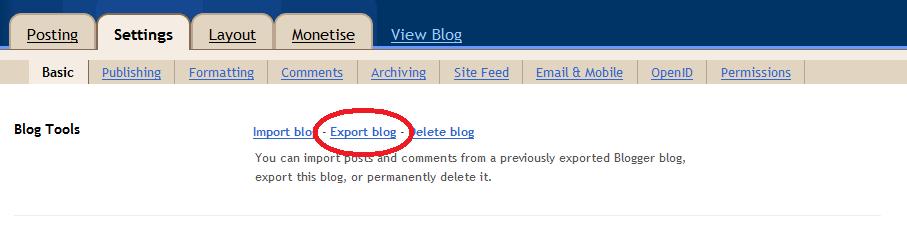
Click on Download Blog and then save your blog in a safe place on your computer. Your posts can then be reinstated by clicking on Import Blog to the left.
b) WordPress Blogs
Click on the Export tab under the Tools menu of your WordPress Dashboard.
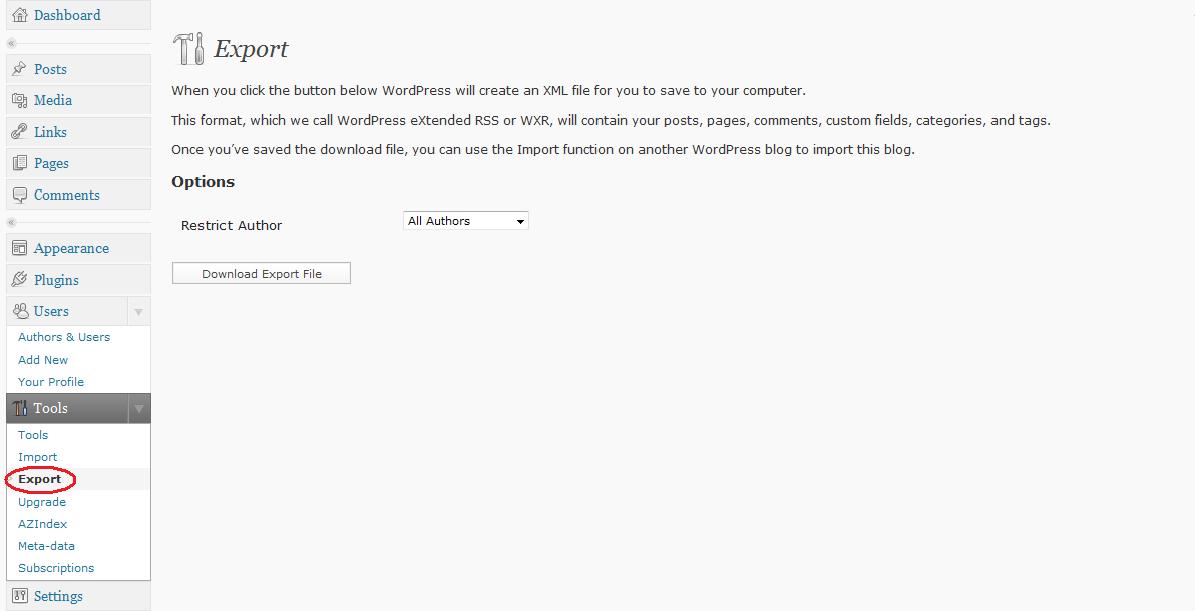
Click on Download Blog and then save your blog in a safe place on your computer. Your posts can then be reinstated by clicking on Import, also under the Tools Menu.
Saving your Images/Photographs
Unfortunately the .xml file you created above will not save the images or other media files that you have uploaded to your blog. It is a good idea to create an upload folder, containing everything you have uploaded to your blog. You can then regularly copy this to a safe place too.
Please note: if you’d like to easily reinstall your blog then you need to maintain the file structure that your blog uses to store photos. This commonly means storing all images in folders according to the month they were uploaded. Check your own settings to see how your files are named.
What next?
That’s it! Now you can relax in the knowledge that your blog’s contents is safe for another day!
To see the other Bloggiesta challenges and join in the festivities visit Maw Books.
























 (which won the Booker prize in 2005).